
Customer Guide


All you need to know about using our transcription and formatting services.

Welcome to Scribie

Thank you for your interest in our services. At Scribie, we provide top-notch transcription and formatting services tailored for various industries.

Scribie simplifies the process of obtaining high-quality transcripts for your audio/video files. It's as easy as uploading your files, selecting the file(s) you want to order, and making the payment. Once the transcription is done, you can then download the transcripts from your account in formats such as Microsoft Word (.docx), Adobe PDF (.pdf), and plain text (.txt) files.

Our team of certified transcribers/editors, who work from home, meticulously prepare timecoded transcripts (see a sample) using our reliable human-verified transcription process, ensuring high accuracy. You can even check the transcript as it is being prepared. In case you require further revisions, we also offer free re-review of the delivered transcripts.

Whether you need interview transcription, webinar transcription, podcast transcription, sermon transcription, focus group transcription, lecture transcription, legal transcription, or video transcription, we have the expertise to handle it all. Our services cover both general transcription and specialized transcription for academic, legal, and business purposes.

Our transcripts are of the highest quality, consistent, well-researched, and delivered punctually. We take the time to research difficult words, acronyms, place names, and other contextual information. If any portions of the audio are unclear, we mark them with a blank and provide timestamps, making it easy for you to cross-check with the original audio file.

We specialize in handling high-quality audio/video files with American-accented speakers and offer the most affordable rates with high accuracy for such files. With over 10 million minutes transcribed since our establishment in 2008, we have a wealth of experience in the field.
Quick Start

Step 1

Upload or import audio/video files

Step 2

Pay with Credit card or PayPal

Step 3

Check and download transcript

If you upload files as a guest, an account will be created for you with the email address supplied during payment. You can monitor the progress of your files, view the draft transcript, download the transcripts, manage payment methods, or order more files from your account.

Payments

We require payments to be made in advance via credit card and/or PayPal. Once the payment is processed, we promptly begin working on your file. As a bonus, we offer free credits for trial runs. Don't forget to join our newsletter to avail of our free credits.

Additionally, we offer billing and invoicing options for large orders (more than $1000/month). To set up a billing account, a contract must be executed. If you require further details, please feel free to contact us.

Delivery Policy

Please note that the turnaround time provided is indicative and is an estimate, and there may be delays during holidays, weekends, or periods of high demand or backlog.

Additional charges may apply for files with non-American accents, poor audio quality, distortions, distant speakers, high background and/or ambient noise. A full refund will be issued if the additional charges are unacceptable, or if the file is untranscribable.

For files longer than 3 hours, there may be a potential delay. To prevent this, we recommend considering file splitting. By trimming the file and selecting a suitable split point that maintains the conversation flow without interruption, each part can be kept under 3 hours in length.

Refund Policy

You can cancel your transcript order at any time before an Editor starts proofreading the file. Once proofreading has started, the Cancel Order option will no longer be available in the drop-down menu. If you choose to cancel, we will issue a full refund for the canceled file. Refunds can be sent to your original payment method or credited to your account.

Please note that we do not offer refunds for sections of the audio file that are blank or contain no spoken content. We recommend using audio editing software like Audacity or utilizing the Trim Audio feature on the files page to remove such portions.

Once the transcript has been delivered, we do not offer refunds. We also do not offer refunds for duplicate files ordered in error. Please double-check your files to prevent unintentional duplication before proceeding with the order.

However, if you find the transcript quality unsatisfactory, we provide free re-reviews. We are committed to achieving the promised 99%+ minimum accuracy and will redo the transcript as many times as necessary to achieve this accuracy level.

Cancellations

You can cancel your transcript order at any time before the proofreading step starts. If you decide to cancel, a refund will be processed within 1 business day. Once a file is canceled, we will issue a full refund for the file. Additionally, upon cancelation, you can download the draft transcript, if available, as a text file from your account.

Once the transcript has been delivered, we do not offer refunds. However, we provide free re-reviews to address any quality concerns you may have.

Integrated Editor

The Integrated Editor is an online tool that helps you quickly and efficiently check the transcript against the audio file. Click on the audio waveform and the cursor will be placed in the corresponding position of the transcript. Conversely, place the cursor in any position of the text and you can play the corresponding audio.

Additionally, you can also play from the start of paragraphs, check and edit any inaudible words that are timestamped and marked with a blank, and cycle through blanks. On Google Chrome, audio playback can also be sped up or slowed down to carefully examine difficult audio sections. Various keyboard shortcuts are also available to help you navigate without the mouse.

The Integrated Editor is packed with features and is a huge time-saver for assessing the accuracy of the transcript. We strongly recommend that you check the file before downloading and add those last finishing touches before using it for your end purpose.

Please also read the Integrated Editor blog post on how to use this tool and learn about keyboard shortcuts that can help you navigate its functions more efficiently.

Confidentiality

Maintaining the confidentiality of all transcription files is our utmost priority. Access to the files is strictly restricted on a need-to-know basis, and limited to our employees and contractors. All transcribers, employees, and contractors are bound by a confidentiality clause outlined in the Terms & Conditions.

Furthermore, you have complete control over your files. Once you delete your files, they are permanently removed from our servers as we do not keep backups. You also have the option to delete your Scribie.com account at any time.

Our website also utilizes industry-standard 256-bit SSL encryption for secure communication between servers and browsers.

We strictly adhere to a no-selling, no-renting, and no-sharing policy for personal information with third parties. Our Privacy Policy covers all data uploaded to our servers, including transcripts. If you require a specific confidentiality agreement, please send the document to support@scribie.com, and we will provide you with a signed copy.

Accuracy

Our commitment to quality ensures a minimum standard of 99%+ accuracy for all transcripts, that is, the transcripts are delivered only when this criterion is met. To achieve this, we utilize state-of-the-art Automatic Speech Recognition (ASR) technology for the initial transcription, followed by a human-in-the-loop process to ensure the highest quality. This collaborative approach, leveraging advanced ASR tools for the initial draft and then having our expert human editors and proofreaders review and refine the transcripts, ensures superior-quality transcripts.

We conduct thorough research for technical terms and acronyms and employ subject matter experts for Legal Transcription, Academic Transcription, and Business Transcription, as well as accent experts for Indian, African, and other non-native accents.

Our philosophy is centered around continuously reworking the file until it meets our high-quality standards. With our dedicated Quality Assurance Team, carefully selected and trained members employ a structured process supported by efficient tools. Files requiring reworking are promptly identified, and the proofreading step is repeated with different editors/proofreaders until 99%+ accuracy is achieved before delivery.

The accuracy of the transcript can be influenced by factors such as the audio file quality and difficulty level. Files with background noise, unclear speakers, or challenging accents may require additional time and effort to transcribe accurately. In such cases, the delivery time may extend to a few days up to one week or so instead of one day. If a file proves to be untranscribable, a full refund will be provided.

If the delivered transcript does not meet your satisfaction, you can request a free re-review. This can be done through your account, where you can provide specific instructions. The file will undergo another round of proofreading and be re-delivered within one business day.

Please note that refunds are not offered once the transcript has been delivered. However, you have the flexibility to cancel your transcript order at any time until the proofreading step starts.

Free Re-reviews

We understand that sometimes the quality of a transcript may not meet your expectations, that's why we offer free re-reviews. If you're unsatisfied with the quality after delivery, you can place a re-review order from your account. Please provide specific instructions, and we will proofread the file once more and send it back to you. The re-review process takes approximately 1 business day.

Customer satisfaction is our priority, and we take feedback seriously. When you place a re-review order, we thoroughly investigate the root causes of any issues and take necessary measures to prevent them from happening again in the future.

Please note that we do not provide refunds after the transcript has been delivered. However, you can cancel your transcript order at any time before the proofreading step starts.

Teams

The Teams feature is a versatile collaboration tool suitable for various types of organizations, whether they are large entities like universities or law firms, or small teams associated with podcasters, YouTubers, or videographers.

To utilize this feature, you can navigate to the settings page of your account and create a team. Once created, you can invite multiple members to join your team and assign each one different roles depending on the access level you want them to have. This enables you to securely share files with team members without disclosing your password.

When you are a part of one or more teams, you can easily switch between your private workspace and the team workspaces by using the dropdown button on the file page. Switching to a team workspace grants you access to various actions such as uploading files, ordering transcripts, reviewing and editing transcripts, viewing invoices, adding credits, and more within the context of the team workspace. All uploaded files and transcripts within the team workspace are shared with all team members, except for the team member with a limited-user role. Additionally, important email notifications are sent to all team members as well.

The person who creates the team holds administrative privileges and can manage team membership by adding or removing members. They are also the only ones authorized to add a payment method for the team.

It's important to note that your private workspace remains exclusive to you and is not shared with other members of the team(s) you may be a part of.

In addition, you have the flexibility to create multiple teams from the same account. Members of each team can only access their respective workspaces and do not have access to the workspaces of other teams.

Please also visit the Team Workspaces blog post for more information about this feature.

Folder Feature

The Folders feature is a powerful organizational tool that allows you to better manage your files and documents. You can use it to group related files and folders together and quickly access them whenever you need them.

To get started with Folders, simply navigate to the All Files page of your account and click on the "New Folder" button. You can then name your folder and click the Create folder button.

Once you have created your folder, you can easily drag and drop files into it, or move existing files into the folder using the "Move" option in the toolbar menu. You can also create subfolders within your main folder to further organize your files.

The Upload Folder feature allows you to quickly and easily upload large numbers of files to your account. You can either drag and drop a zipped folder or click on the "Upload" button on the Uploads page to select the zipped folder from your computer. You can also drag and drop the zipped folder on the All Files page.

Please note that by default, folders are private and can only be accessed by the account holder. Your private files will remain private and cannot be accessed by other users.

For more information and screenshots on how to use this feature, please visit the Scribie Folder Feature blog post.

Account Credits

Account credits are funds that you can add to your Scribie account and use to pay for transcript orders, formatting orders, or any other payments on Scribie. Your credit card will be charged only once. You can add anywhere from $10 to $15,000 at a time. Account credits can also be shared with team members and they do not expire. However, account credits cannot be withdrawn or transferred. You can only use them for payments on Scribie.

You can add credits from the settings page. You can also choose to send any refunds to your account credits from the settings page.

Transcription Process

Our transcription process combines the latest AI technology with our industry-leading human-in-the-loop expertise to maximize efficiency, making it an unbeatable proposition for our valued customers.

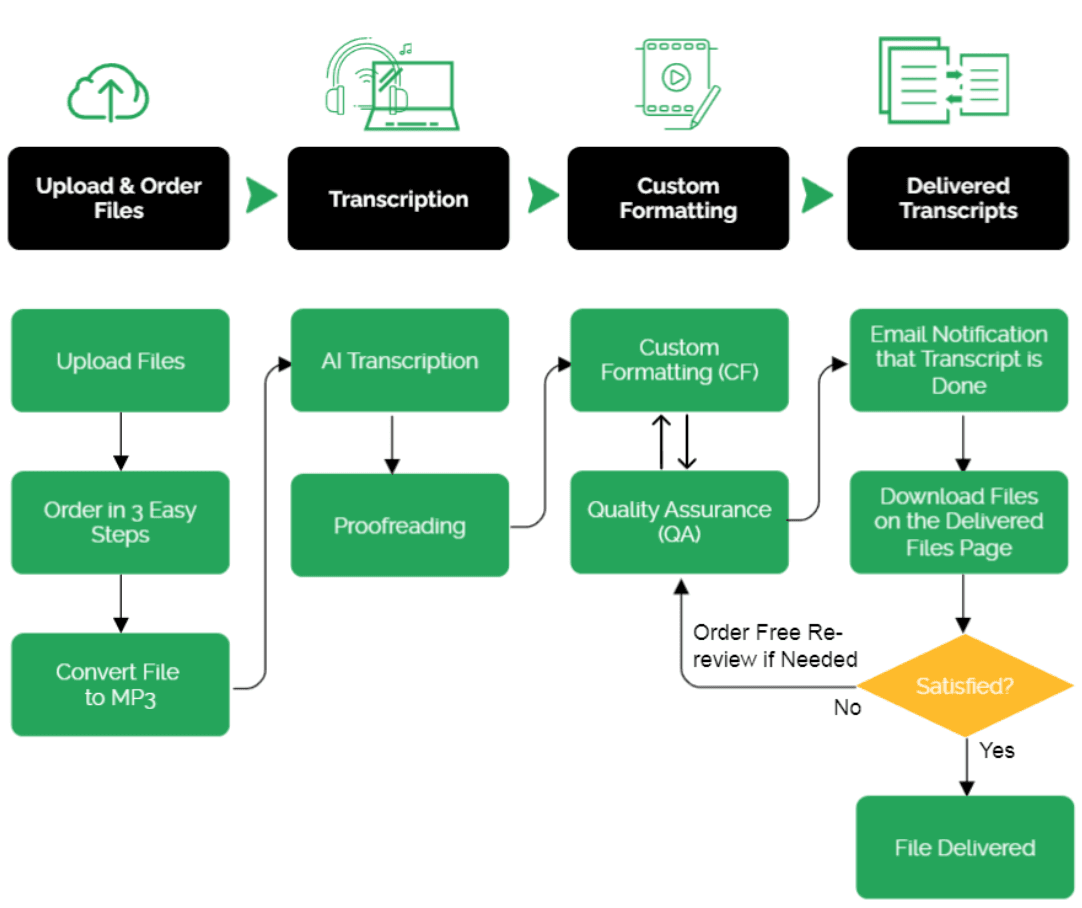
We utilize cutting-edge ASR technology to generate the initial draft, which is then refined and proofread by our expert editors. For orders requiring custom formatting for legal files, we include an additional step where the specific formatting and style guidelines provided by the customer are applied. Finally, our finalizers review the content and formatting to ensure that the files are thoroughly quality-checked, consistent, and meet the highest standards.

Our philosophy is to keep re-working the transcript until the quality standard of 99%+ accuracy is achieved. The following is an illustration of our process.

Scribie's transcription and formatting process diagram

Our online transcription system manages all of the above stages. All our transcribers are home-based freelancers who have gone through our certification process and are paid on an hourly basis for their work. The system monitors their performance and handles the payments made to them. We provide them with efficient transcription and formatting tools and comprehensive guidelines for transcription and formatting. These guidelines are strictly enforced, and their performance is evaluated.

We have rethought the audio transcription process for the internet age and designed our audio transcription system from scratch to deliver high-quality transcripts with minimal cost and effort. Our system and service have a proven track record, with over 10 million minutes transcribed to date. Here are some unique features provided by our system:

  • You can track the progress of your order and check the draft transcript anytime.
  • Collaborative team on each file, resulting in higher transcript quality. The proofreading step and QA step are repeated, if needed, until the minimum accuracy we guarantee is met.
  • Consistent and repeatable results due to a common set of guidelines.

Our system is unique and can be best described as a Mechanical Turk for audio transcription. You can learn more about our transcription system in detail through a series of posts on our Transcription System blog category.

Transcript Format

We offer two types of formatting for delivered transcripts. The first is our default formatting, which includes timecoding, speaker tracking, and the speaker's dialogue. The second is custom formatting, where we adjust the content based on your style guidelines and templates.

Default Format

The text of the transcript is broken into paragraphs, with each speaker's diction transcribed on a new paragraph. New paragraphs are started at every change of speaker or every 3 minutes, whichever occurs earlier.

We provide audio timecoding and speaker tracking by default. If the names of speakers are provided or mentioned in the audio, we use them. Otherwise, we use "Speaker 1," "Speaker 2," and so on. For an illustration of the formatting, you can check the sample transcript. For monologues, the speaker name or "Speaker 1" is used throughout. Monologues are also broken into paragraphs approximately every 3 minutes.

You have the option to disable both audio timecoding and speaker tracking when ordering or downloading the transcript. The transcript does not include any speech analysis symbols.

By default, the transcripts are clean verbatim, omitting utterances (e.g., "mm-hmmn," "uh-huh," "um," "uh"), fillers (e.g., "you know," "like," "right," "so"), interjections, and false starts. However, when the Strict Verbatim option is enabled, everything is included.

You can specify the spelling style along with your order. We currently support American, British, Australian, and Canadian English spelling styles. If not specified, the spelling style is automatically chosen based on your current location. If you have different requirements or need more options, please contact us.

Custom Format

Custom formatting is available upon request and is subject to an additional charge based on the specific requirements. The cost is determined by the complexity of the formatting and how much it deviates from the default format.

In case you need extra formatting on your transcript that deviates from our default formatting, please select the Format option when placing your order. When Format is selected as the order type, we will transcribe the file and then apply the formatting requirements based on the instructions or guidelines and sample output provided.

The first step in ordering custom formatting is to contact support with your specific formatting instructions and sample output. This allows us to assess the scope of work and provide an estimate for any additional charges. Once we agree on the custom formatting rate, we will configure your account accordingly. After this setup is complete, you can proceed with placing your order.

If you already have the transcript and you want it to be custom formatted, you can also order it from us. Please email us at support@scribie.com with your custom formatting instructions and sample files (input and output) and we will be happy to generate a custom formatting quote for you.

Transcript File Formats

The transcript files are delivered in the following formats:

  • Microsoft Word (.doc)
  • Adobe PDF (.pdf)
  • Plain text (.txt)

A template file is used for conversion for the first three formats. The plain text file contains only the transcript in UTF-8 encoded text.

Additional Charges

Our rates and turnaround times are based on files with clean audio and American speakers. However, for files with the following issues, an additional charge of $0.50/minute to $1.00/minute may apply, along with a potential delay in delivery.

IssueExamples
Ambient Noisehiss, line noise, static
Noisy Environmentstreet, bar, restaurant or other loud noises in background
Distant Speakersfaint, distant voices
Accented SpeakersBritish, Australian, Indian, Hispanic, any other non-American
Audio Breaksbad phone line, audio gaps
Disturbancesloud typing sounds, rustling, wind howling, breathing sounds
Distortionvolume distortion, shrill voices, clipping
Unclear Speakersmuttering, volume variation, frequent overlaps
Echoreverberation, same voice can be heard twice
Qualitylow sampling/bit rate, bad conference line, recorded off speakers
Dictionslurring, rapid speaking, unnatural pronunciation
Muffledhidden or obstructed microphone, vintage tapes
Blankonly music, only background conversation, only non-English

The additional charge is NOT applied automatically and can be declined. Please note that additional charges are non-negotiable and final. According to our terms of service, our assessment is final and binding, and any disagreement will result in immediate order cancelation.

Based on our data, files with any of the listed issues require approximately 3 to 4 times more effort to ensure 100% accuracy. Compensating our transcribers for the additional time and effort is the most efficient approach to achieving our goal. Our system is optimized for clean files with American speakers, providing the best accuracy-to-price ratio for such files.

For recommendations on how to avoid these charges, please refer to our recording tips. You can also read our manifesto for a broader understanding of the reasoning behind this policy.

Accented Speakers

Our base rates apply to files with American-accented speakers. For files with speakers of other accents, additional charges will be incurred. We have expertise in a wide range of accents, including British, Australian, Indian, African, as well as various European and Asian accents.

We guarantee 99%+ accuracy for files with accented speakers. Please note that accented files may require more time and may be subject to additional charges.

Noisy Files

We can transcribe files that are recorded in noisy backgrounds, such as cafes or crowds, as long as the main speakers are clear and audible. Even files with ambient background noise, like air conditioning hiss, can be transcribed as long as the main speakers can still be heard clearly.

Please note that noisy files may require additional time to process and may also incur additional charges. In cases where the files are deemed untranscribable, a full refund will be issued.

Recording Tips

The audio quality of the recording is the most crucial factor that impacts transcript accuracy. Good audio files require less time and effort to transcribe, which is why our system prioritizes them. In comparison, poor audio files require approximately 3 to 4 times more effort. To save on transcription costs and ensure highly accurate transcripts, we recommend following these simple steps:

Best Practices

The following recommendations apply to all types of recordings.

  • Smartphones are the best recording devices available today, and we recommend using them instead of digital/tape recorders. Smartphones have good microphones and provide built-in apps for recording.
  • The first 30 seconds of the recording should always contain silence. This allows it to be used as a noise profile while cleaning the file. We recommend using Audacity for cleaning.
  • For optimal quality, we recommend using a minimum of 128 kbit/s encoding sampling rate with a 16-bit depth.
  • Recordings should be made in an environment with minimal ambient noise. If ambient noise is unavoidable, we recommend recording 30 seconds of silence at the beginning and using it to clean the recording afterward.

In-person Recordings

In-person recordings are recordings made with two or more participants in the same room or place. The following are our recommendations:

  • The recorder should be kept equidistant from the participants. For group discussions or focus groups, the optimal arrangement for participants is a circle with the recording device kept at the center.
  • The recording device should be kept on a book or some other soft material that can absorb keyboard sounds or any other disturbances. Disturbances sometimes can obscure the speaker's diction and should be kept avoided as much as possible.
  • We suggest recording with at least two devices to have an alternate version available if needed.
  • For lectures/event recordings where only the main voice is required, edit the audio file afterward and remove other voices. This will reduce the cost of the transcript as well.

Phone/Online Call Recordings

Phone recordings are interviews/conversations over the phone which are recorded off-the-speaker. We recommend using a conferencing service to record phone calls and fall back on recording off-the-speaker. These recommendations also apply to internet phone calls such as Skype, Google Hangouts, WebEx calls, etc.

  • The recording device should be directed toward the speaker of the phone/computer.
  • Use high-quality speakers, if possible external speakers connected to the phone/computer. Smartphones do not usually have good speakers and should be avoided. We recommend using them only as the recording device as they have good microphones.
  • If there is a detectable line noise (buzzing sound on the phone line), try disconnecting and calling again. Line noise is very hard to remove and disorienting for the transcribers.

Order Options

You can specify certain options when placing your order with us. The following table presents the available order options for our transcription and formatting services, indicating which ones are free and which ones involve additional costs.

Free OptionsOptions with Additional Cost
Speaker Tracking (enabled by default)Strict Verbatim (+$0.50/minute)
Audio Time-coding (enabled by default)Rush Orders (+$1.25/minute)
Subtitle File (machine-generated)Closed Captions (+0.59/minute)
Transcript TemplateCustom Transcript Template
Spelling Style

Strict Verbatim

We will include all utterances, e.g. 'mm-hmm', 'uh-huh', 'umm', and 'uh', fillers, and false starts in the transcript. By default, transcripts are non-strict verbatim and do not include these unless necessary. An additional charge of $0.50/minute of audio is applicable for strict verbatim transcripts.

Rush Orders

By opting for a rush order, we will prioritize the processing of your file, significantly expediting its completion. The turnaround time for rush orders is typically three to five times faster than our standard processing time.

Subtitle File

We also provide subtitle files in SubRip (.srt) and WebVTT (.vtt)formats. Only basic versions are supported, without any style markup. These subtitle files are machine-generated based on the transcribed content. The timecode accuracy is +/- 1 second. Please contact us if you require subtitle files in other formats. No additional charges apply for this option

Audio Timecoding

We provide audio timecoding by default. Timecoding refers to the process of adding the running time of the audio before each paragraph. New paragraphs are started at every change of speaker or 3 minutes, whichever is earlier.

Each paragraph begins with the audio time which indicates the running time of the audio file at which the particular speaker started speaking for that paragraph. We provide an accuracy of +/- 1 second for the time stamp. For higher accuracy, please contact us.

Speaker Tracking

We provide speaker tracking by default. Speaker tracking refers to the process of adding the speaker tags before each paragraph. New paragraphs are started at every change of speaker or every 3 minutes, whichever is earlier. Before each paragraph, we add the speaker name, if available, or their order of appearance in the audio, e.g. Speaker 1, Speaker 2, etc. We also provide an option to specify the speaker names before the order is placed. The speaker names can also be changed after the file has been delivered using our Integrated Editor.

We do not have a maximum number of speakers to be tracked. However, it may be difficult to identify the speakers if there are four or more speakers in any file. We mark such speakers as S? in the transcript. This issue can be avoided if the speakers speak aloud their names at each turn. Otherwise, the speaker tracking is best-effort and we cannot guarantee the correctness.

There is no extra charge for speaker tracking.

Spelling Style

We support the following spelling styles.

  • American
  • British
  • Australian
  • Canadian

Transcript Template

This option allows you to specify the template file used for document conversion. The following transcript templates are available.

The sample transcript has been formatted with Scribie Single Line Spaced template. We also support custom template files. Please contact us with your template file to have it set up.

Free OptionsOptions with Additional Cost
Scribie Single Line SpacedContains a title page, Scribie Logo, header, footer, and the transcript is single-line spaced
Scribie Double Line SpacedSame as above, except the transcript is double-spaced
Blank Single Line SpacedContains only the transcript which is single-line spaced
Blank Double Line SpacedSame as above, except the transcript is double-spaced

Closed Captions

We provide closed captions by having our captioners edit the machine-generated subtitle files or proofread transcripts to ensure compliance with basic captioning regulations. Our captioners ensure that the captions adhere to ADA (Americans with Disabilities Act) regulations.

Standard/basic closed captions incur an additional charge of $0.59 per minute.

If you require non-standard options such as specific caption placement or FCC (Federal Communications Commission) compliance, please reach out to us with a list of your requirements. The additional cost will vary depending on the complexity of your requirements.

Unique Selling Points

Our transcription service offers features that save you time and money. Transcription is very labor-intensive work and we ensure that you get the best possible transcript.

  • Our transcription process combines the latest AI technology with our industry-leading human-in-the-loop expertise, ensuring that the files consistently achieve a minimum accuracy of 99%.
  • You pay a fixed price for the transcript based on the audio length and not the time spent transcribing.
  • We provide the best price-to-accuracy ratio for clean files with American speakers.
  • We are committed to quality. The additional charges ensure that the transcript is as accurate as possible, regardless of the difficulty level.
  • We carefully vet each one of our transcribers and continuously monitor their performance.
  • We research uncommon terms, acronyms, etc., and ensure that the transcripts are contextually correct.
  • We deliver files on time. If we anticipate a delay then we will inform you well in advance.
  • You can monitor the progress and check the Draft Transcript from your account at any stage.
  • You can order a free re-review if you are not satisfied with the transcript.
  • We are consistent, predictable, and accurate. You can plan around us.
  • As a company, we take confidentiality very seriously and we handle your files with utmost care.
  • We respond to your questions in a timely manner and continue supporting you even after the file is delivered.

Sample Transcript

The following is a sample audio and the corresponding transcript. More sample transcripts are available on our blog.

Sample Audio

Support

We provide phone, live chat, and email support on weekdays and email support on weekends. Our customer support team is well-trained and responsive. We ensure that all questions and issues are addressed promptly. Please do not hesitate to reach out to us.